Choose your driver, book your journey, reconnect with familiar drivers and travel together. Find answers about Ride Now, Ride Later, Ride Again, Ride Together, fares and more.
The Swaraaj Rider App is a cab and auto booking app that gives you the freedom to choose the driver you want to travel with, rather than leaving the choice entirely to an automated algorithm.\n\nYou can book a ride whenever you need to travel, choose from available drivers, and travel again with drivers you already know and have had a good experience with.\n\nSwaraaj also helps you plan journeys in advance and travel together with friends or colleagues through Ride Together, so you can coordinate sharing the travel cost. Swaraaj brings the choice of driver back to the rider—making everyday travel more personal, familiar and convenient.
How is Swaraaj different from other cab booking apps?Q2
In many cab booking apps, an automated system decides which driver is assigned to you. You may end up travelling with a different, unfamiliar driver every time. Swaraaj gives you more choice and control over whom you travel with.\n\n• Choose an available driver instead of depending only on automated assignment.\n• Travel again with familiar drivers and check your own previous experience with them.\n• Plan ahead using Ride Later.\n• Invite friends or colleagues travelling in the same direction through Ride Together and coordinate sharing the travel cost.\n• Build familiarity and trust by reconnecting with drivers you know.
Does Swaraaj automatically assign a driver to me?Q3
No. Swaraaj gives you the option to choose a driver from the available options and send a booking request. The selected driver can accept or reject the request. Your booking is confirmed once the driver accepts it.
Can I book both cabs and autos through Swaraaj?Q4
Yes. You can use Swaraaj to find and book available cab and auto drivers, depending on availability in your selected location.
Is the Swaraaj Rider App free to download?Q5
Yes. The Rider App is free to download. Applicable trip fares and charges are payable for the journeys you take.
Why should I prefer Swaraaj whenever I travel?Q6
Travelling with Swaraaj helps you to create a pool of your own trusted and familiar drivers for future travel because Swaraaj gives you an alternative to depending on a different, automatically assigned driver every time. You can choose from available drivers, travel again with a familiar driver, check your own previous rating of that driver, plan important journeys through Ride Later, invite friends or colleagues through Ride Together, keep trip history and invoices in one place, and share your live trip location. Whether you are travelling across town, going to the airport, visiting a customer or planning a family journey, Swaraaj gives you more choice in how you travel.
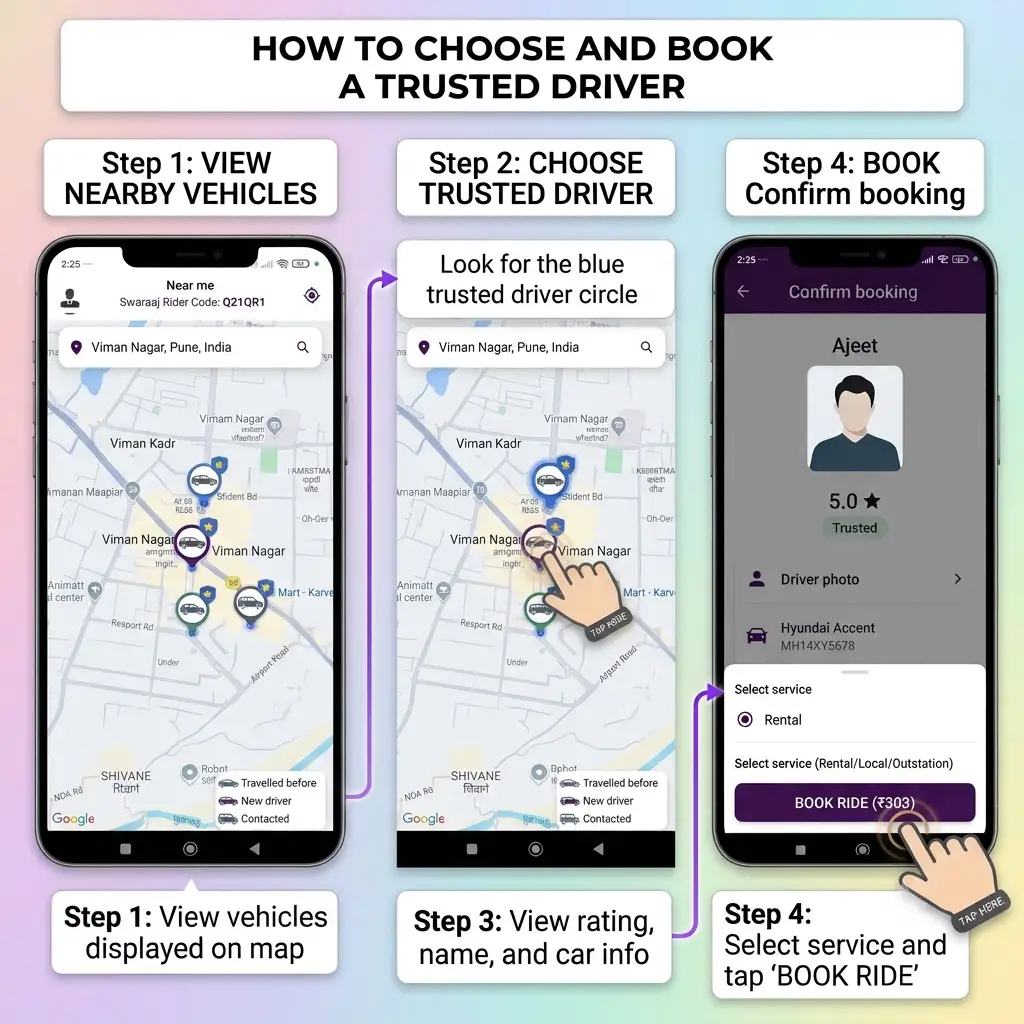
Open the Swaraaj Rider App and view the available drivers around your selected location. You can view driver profiles, check vehicle information, distance and estimated arrival time, and select a driver for your journey. After selecting the driver and sending a booking request, the driver can accept or reject it.
Swaraaj rider app book a cab stepsDriver profile when online
What is the difference between Ride Now and Ride Later?Q8
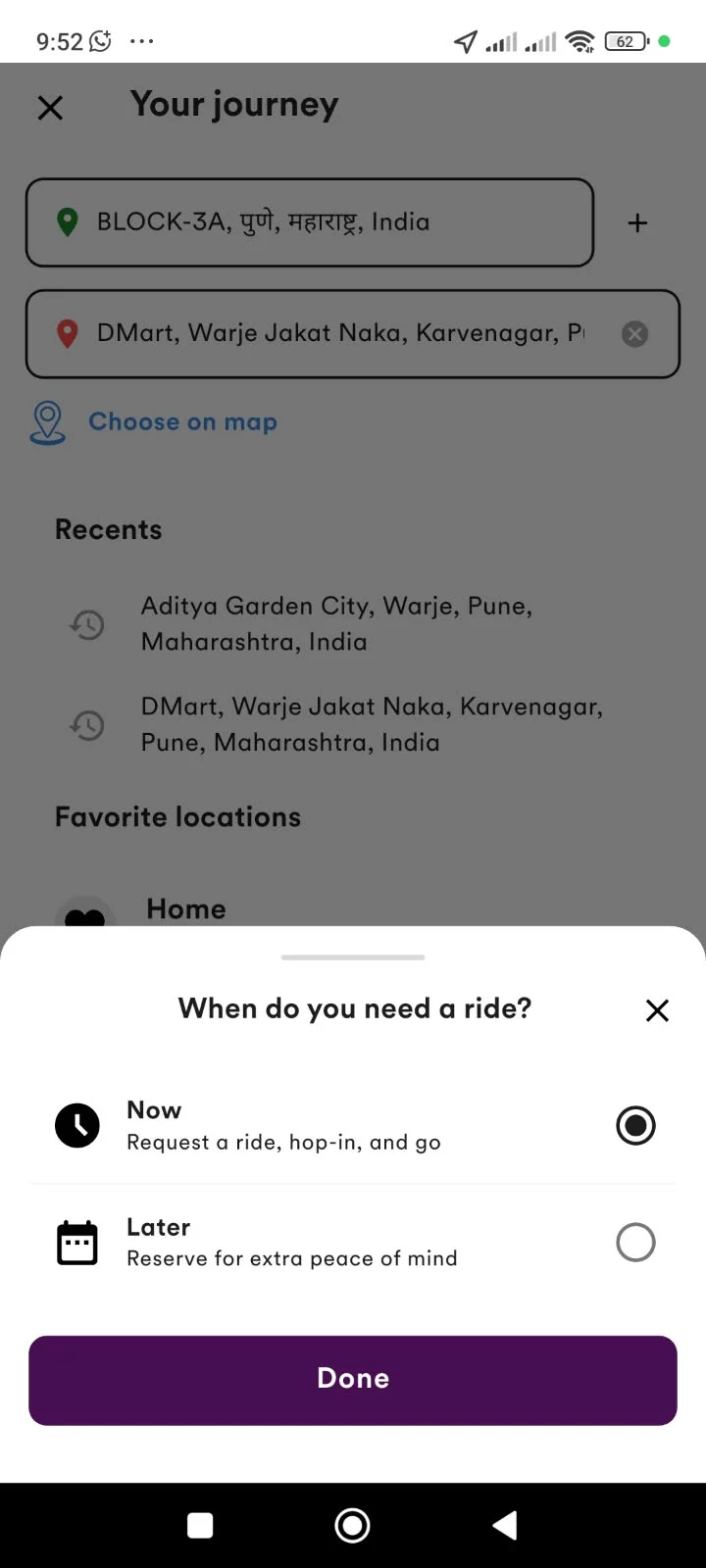
Ride Now lets you send a booking request when you need to travel immediately. Ride Later lets you schedule a journey for a future date and time. Choose the option that suits your travel requirement.
Ride Now or Ride Later
Can I book a ride without using the Rider App?Q9
Yes. You can approach a Swaraaj cab or auto on the road and request a Hail/Spot trip directly with the driver. If you want the trip linked to your Swaraaj account, you can share your Rider Code or mobile number before the trip starts.
Can I contact a driver before booking?Q10
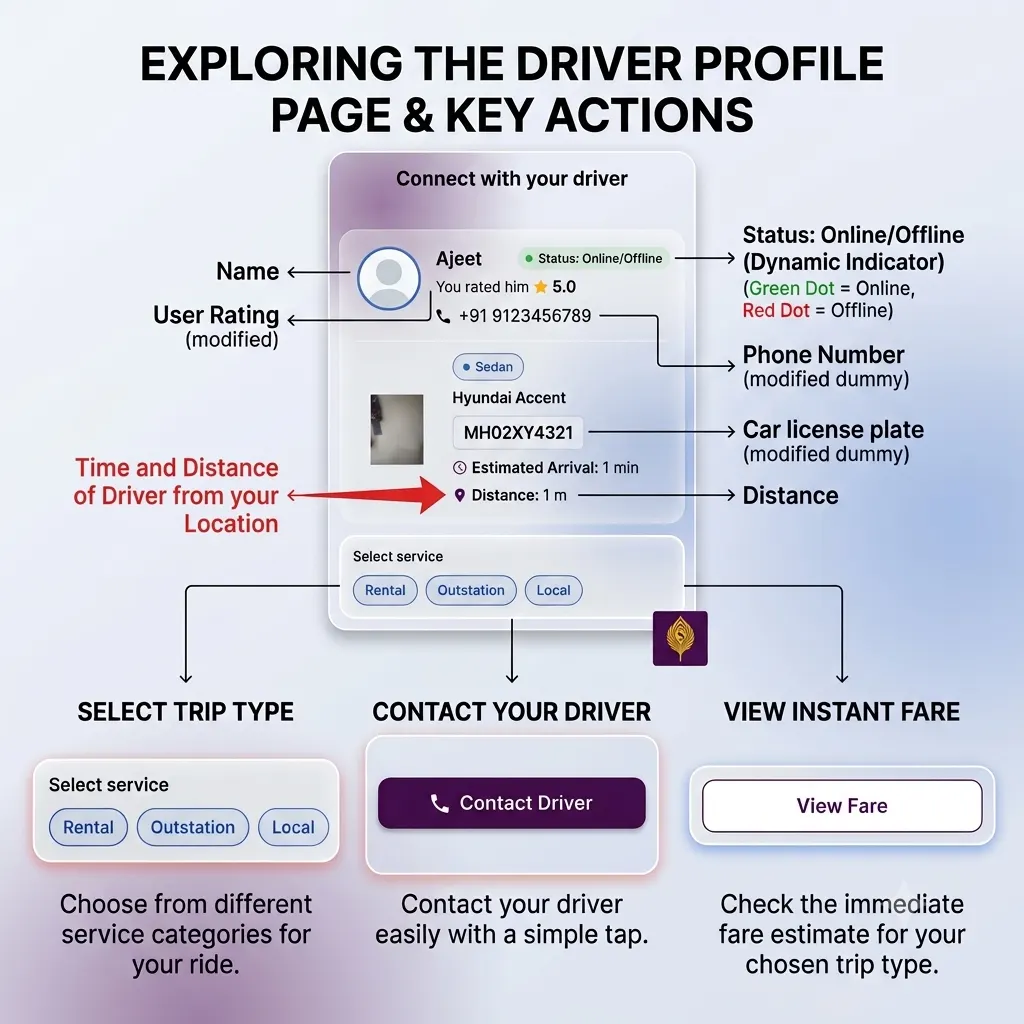
Yes. The driver's profile provides an option to contact the driver before booking, if you wish to speak to them first. This is an additional option for your convenience. You can also proceed directly with the booking request without calling the driver.
Contact option on driver profile
What should I do if I cannot find a suitable driver?Q11
You can check the available drivers around your selected location or search for drivers in another location. You can also try again after some time, as driver availability may change.
Can I book a ride for someone in another location?Q12
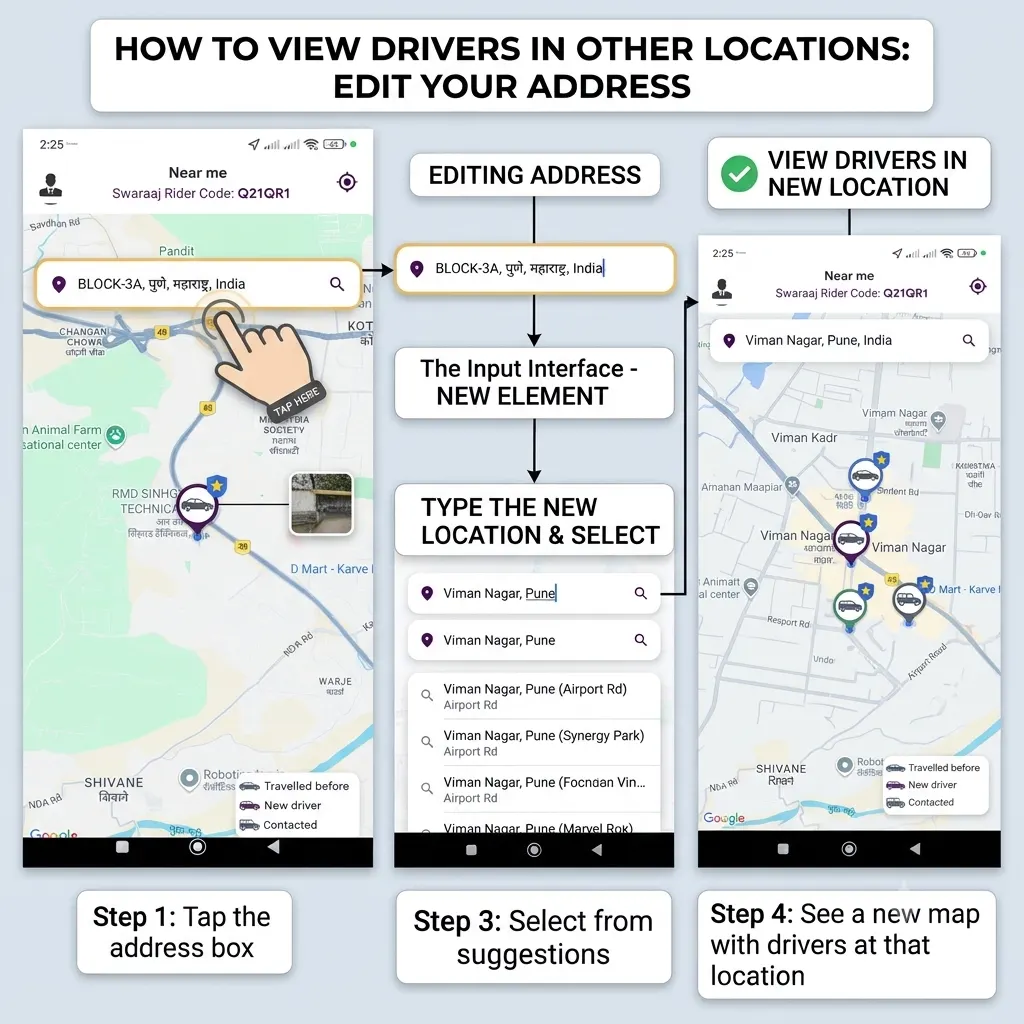
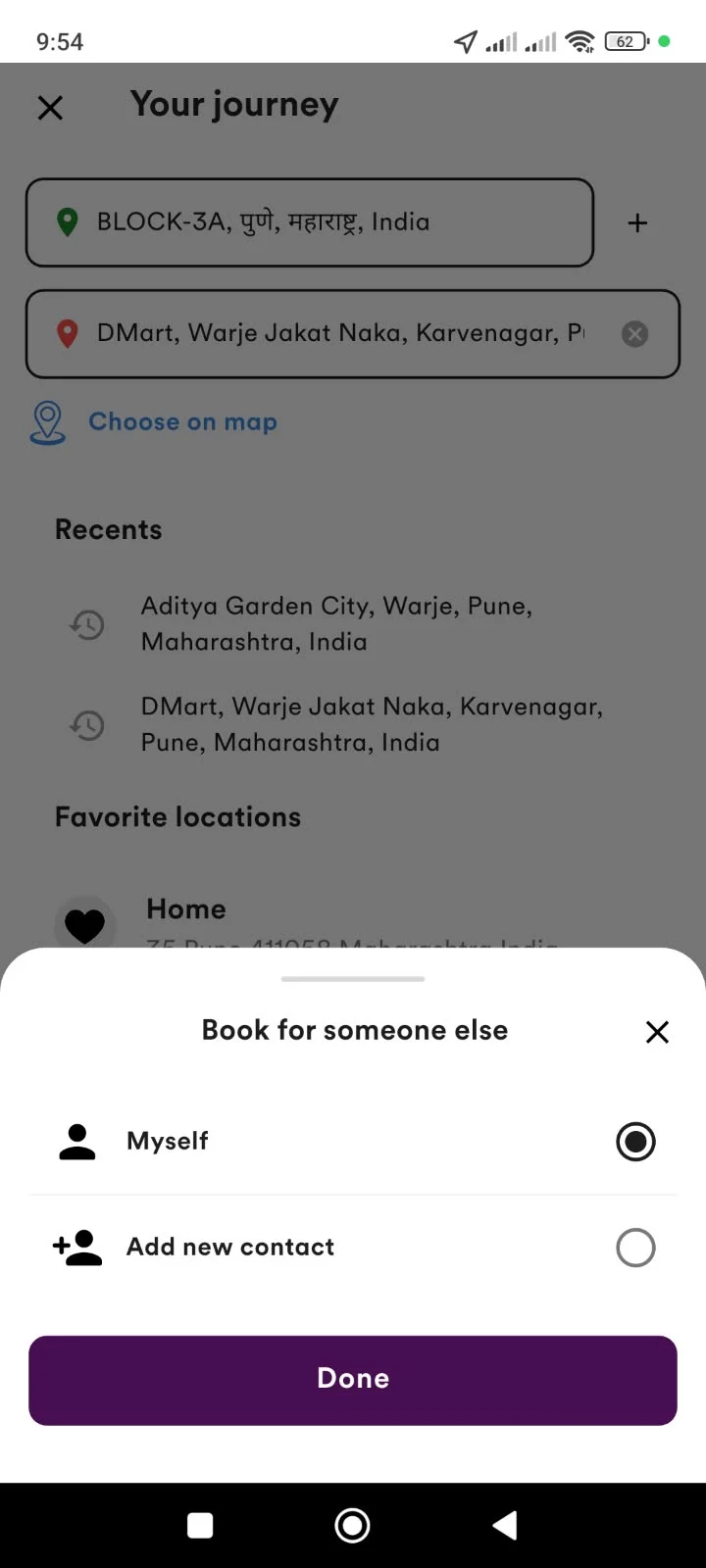
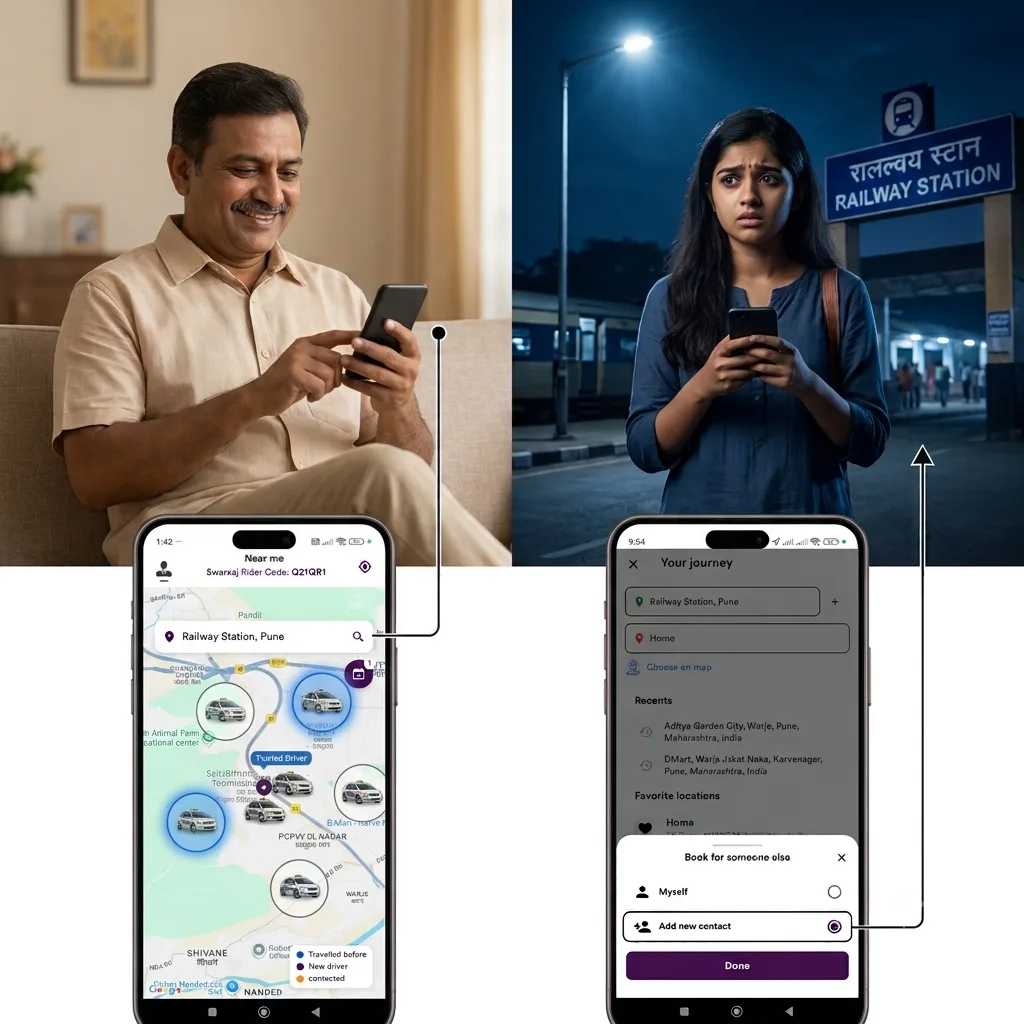
Yes. Swaraaj allows you to search for drivers at another location and book a trip for someone else. Select or enter the required location, choose the option to book for someone else, select a driver and proceed with the booking.
Search drivers in another location
Can I choose a driver based on my preference?Q13
Yes. You can view available driver profiles and use the information shown in the app—such as vehicle details, distance, estimated arrival time and your previous experience with that driver—to help make your choice.
What does the blue driver icon mean on the map?Q14
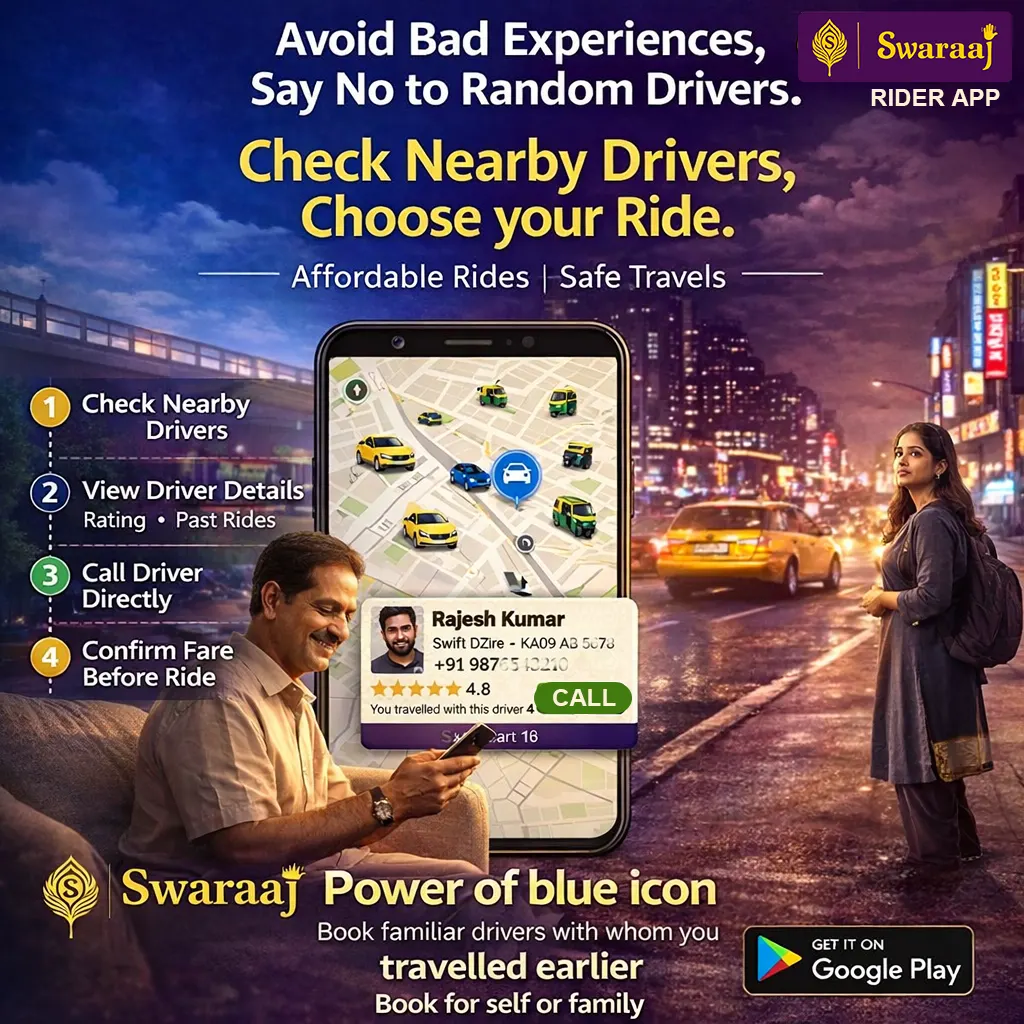
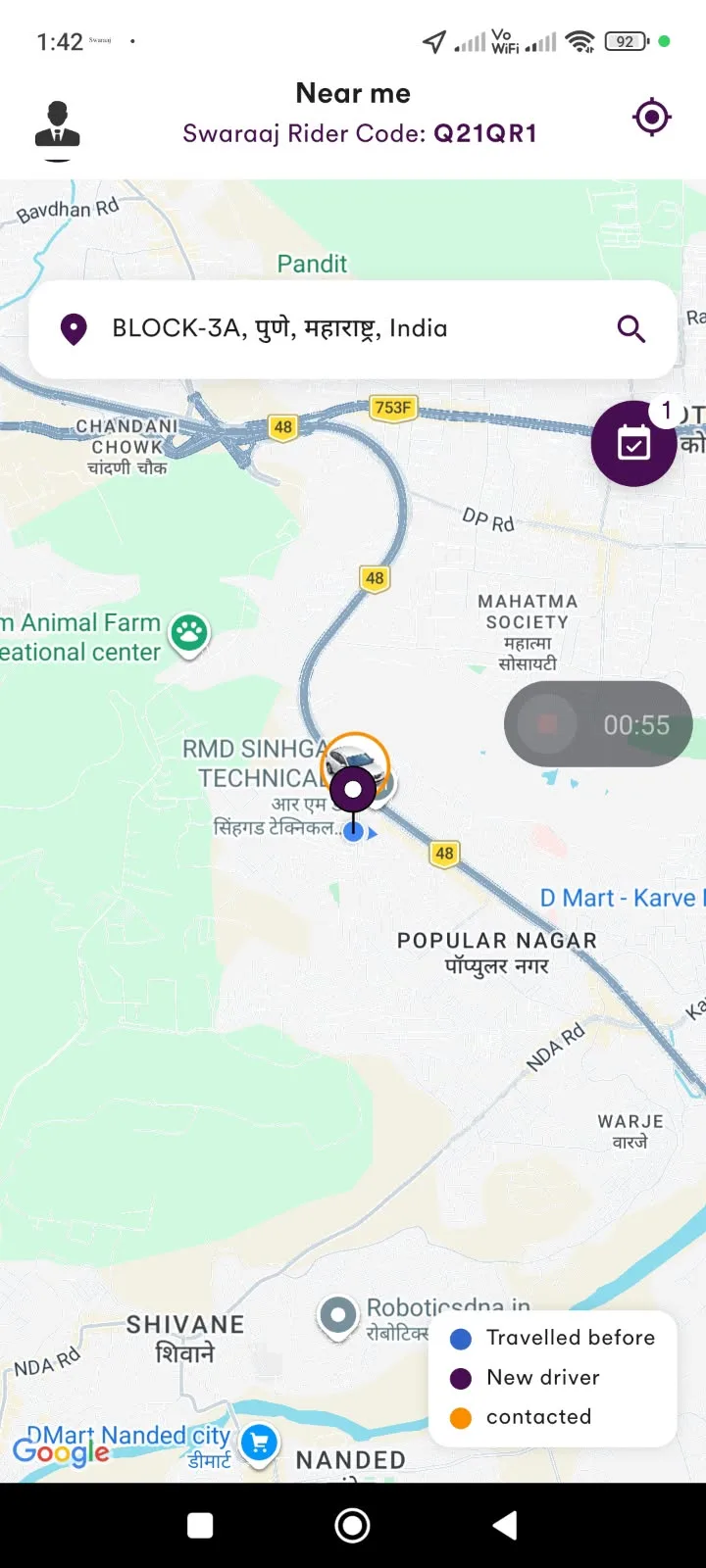
The blue driver icon indicates a driver you have travelled with earlier. It helps you identify familiar drivers on the map when looking for a driver for another journey.
What is the difference between a blue driver icon and other driver icons?Q15
The blue icon identifies a driver you have travelled with before. Other driver icons indicate other drivers or statuses shown on the map. Refer to the map legend in the app for the current icon meanings.
Can I see how many times I have travelled with a driver?Q16
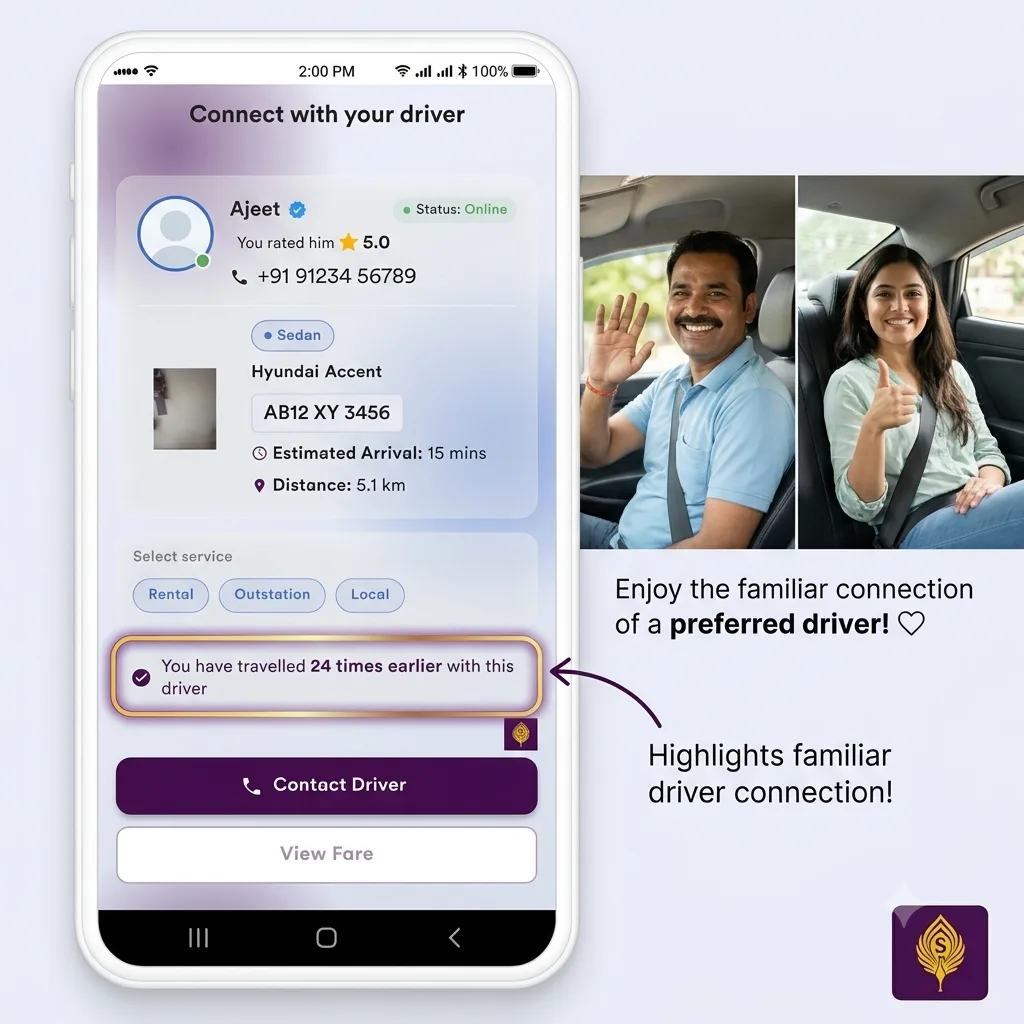
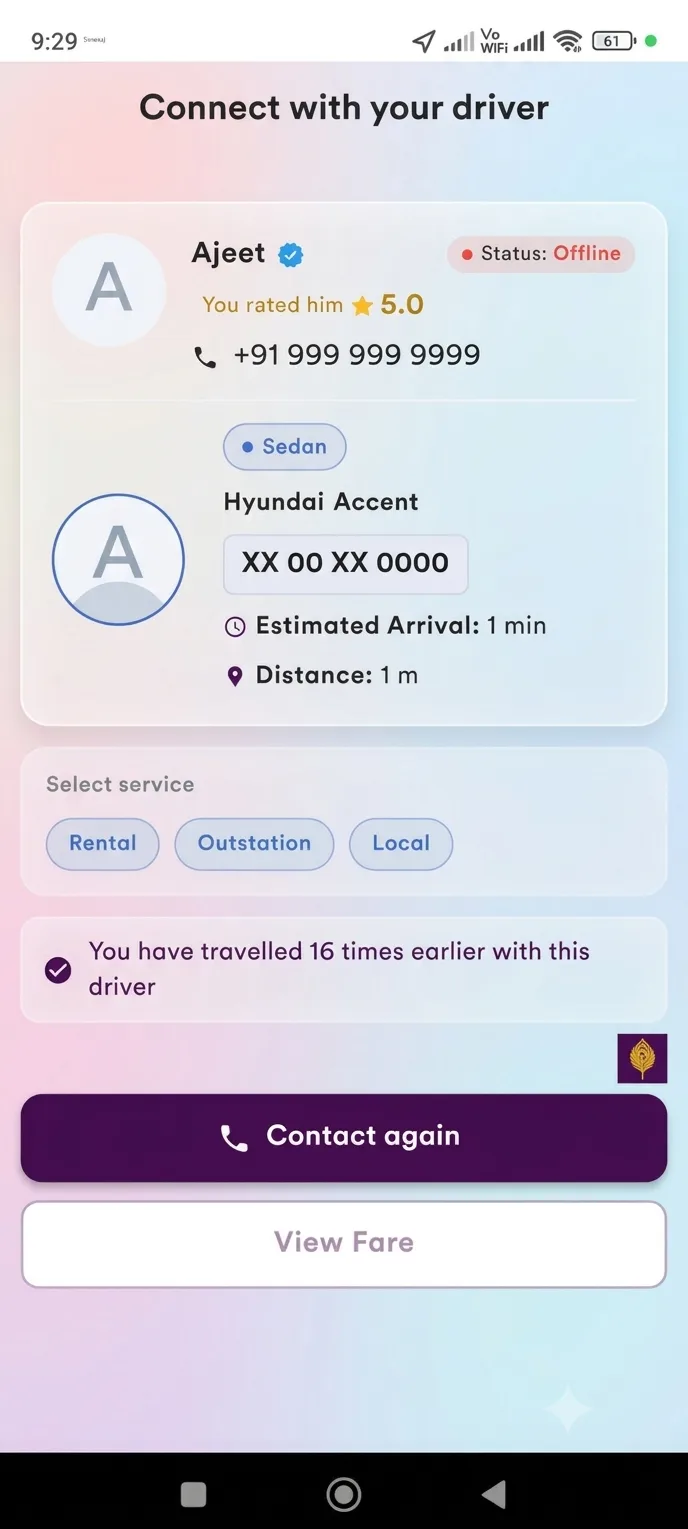
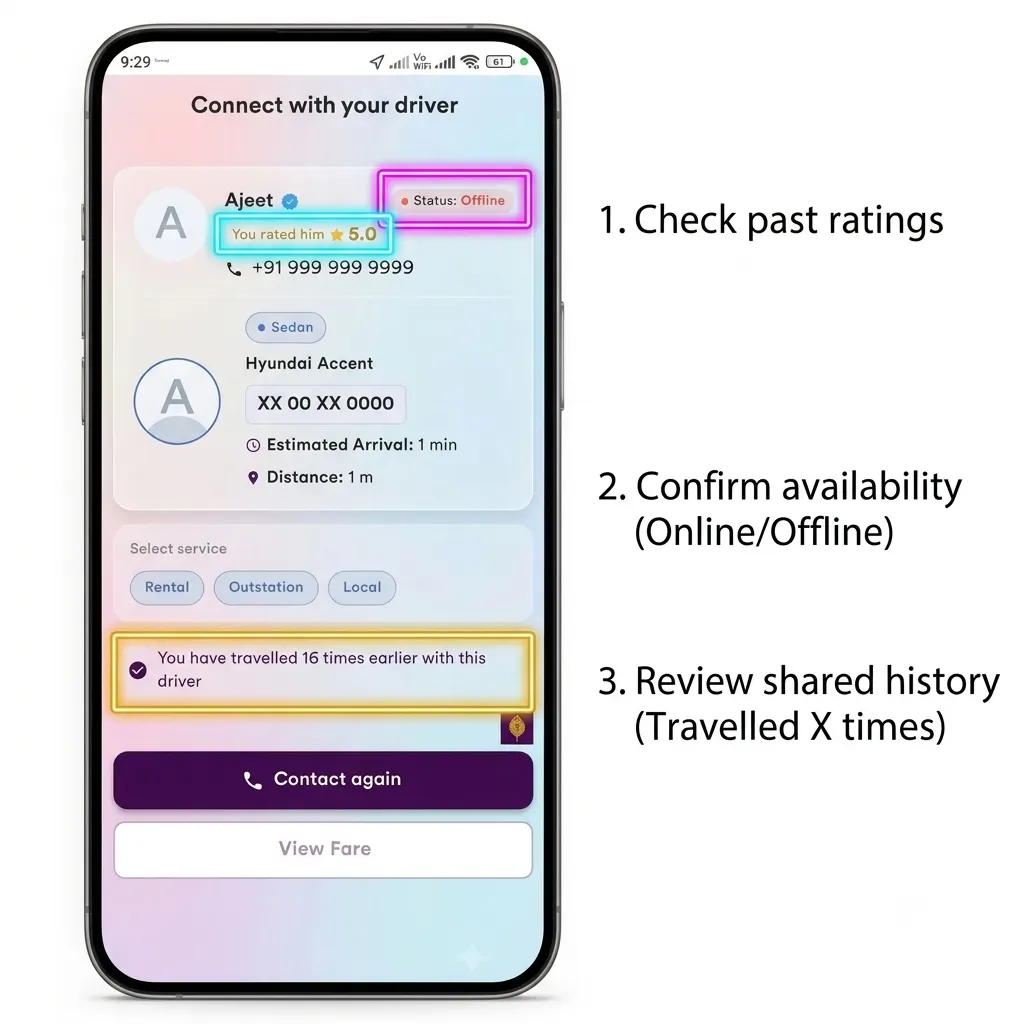
Yes. The driver's profile displays the number of times you have travelled with that driver earlier. This helps you identify drivers with whom you have an existing travel history.
Driver profile and your previous trips
Can I check my own rating of a driver?Q17
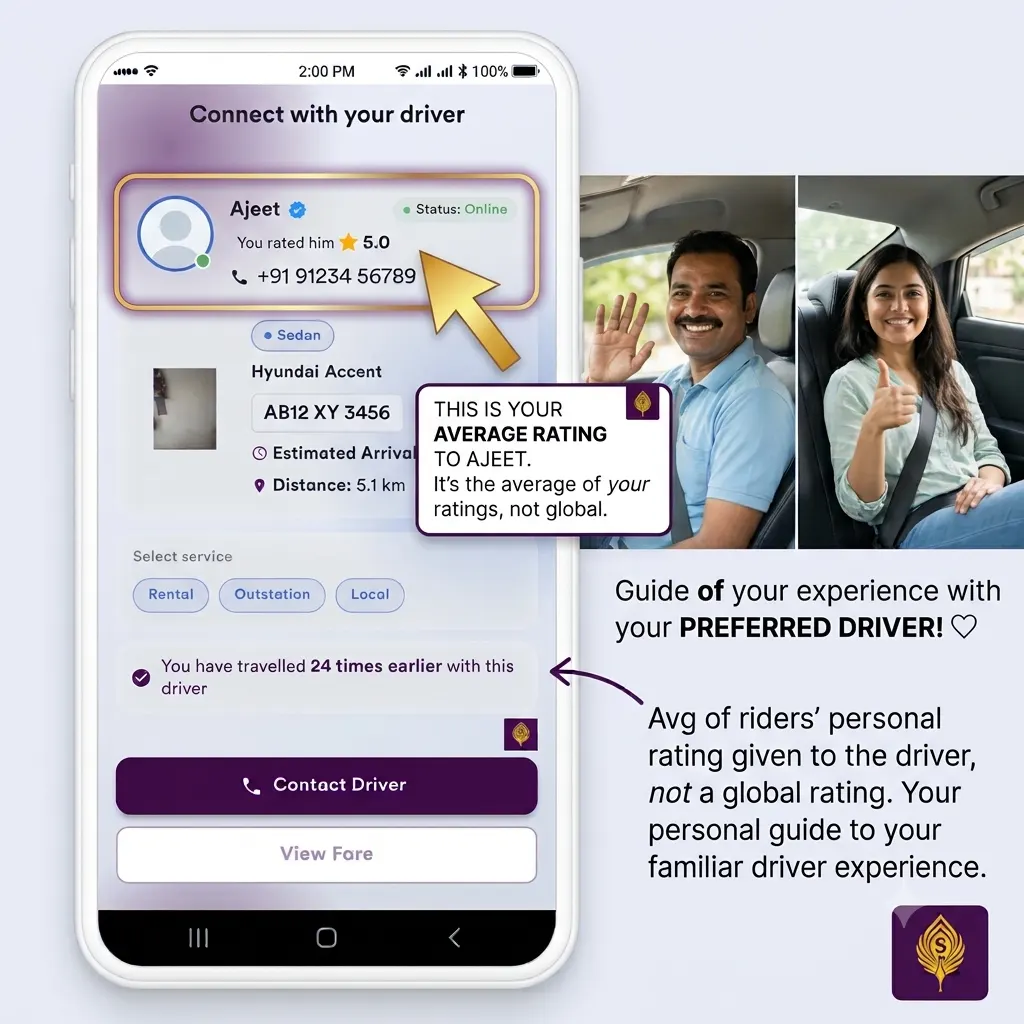
Yes. Swaraaj shows the average rating you have personally given to that driver based on your previous trips. This is different from the driver's overall rating given by other riders. It helps you make a choice based on your own experience.
Rate the driver after the trip
Why is it useful to travel again with a familiar driver?Q18
Travelling with a driver you already know can make your journey more comfortable and familiar. You may already know the driver's service, behaviour and driving style. Swaraaj helps you reconnect with such drivers instead of starting from scratch every time.
Does a blue icon mean that the driver is available for my trip?Q19
No. The blue icon indicates that you have travelled with the driver earlier. It does not guarantee that the driver is currently available or willing to accept a new trip. Check the driver's current status and send a booking request.
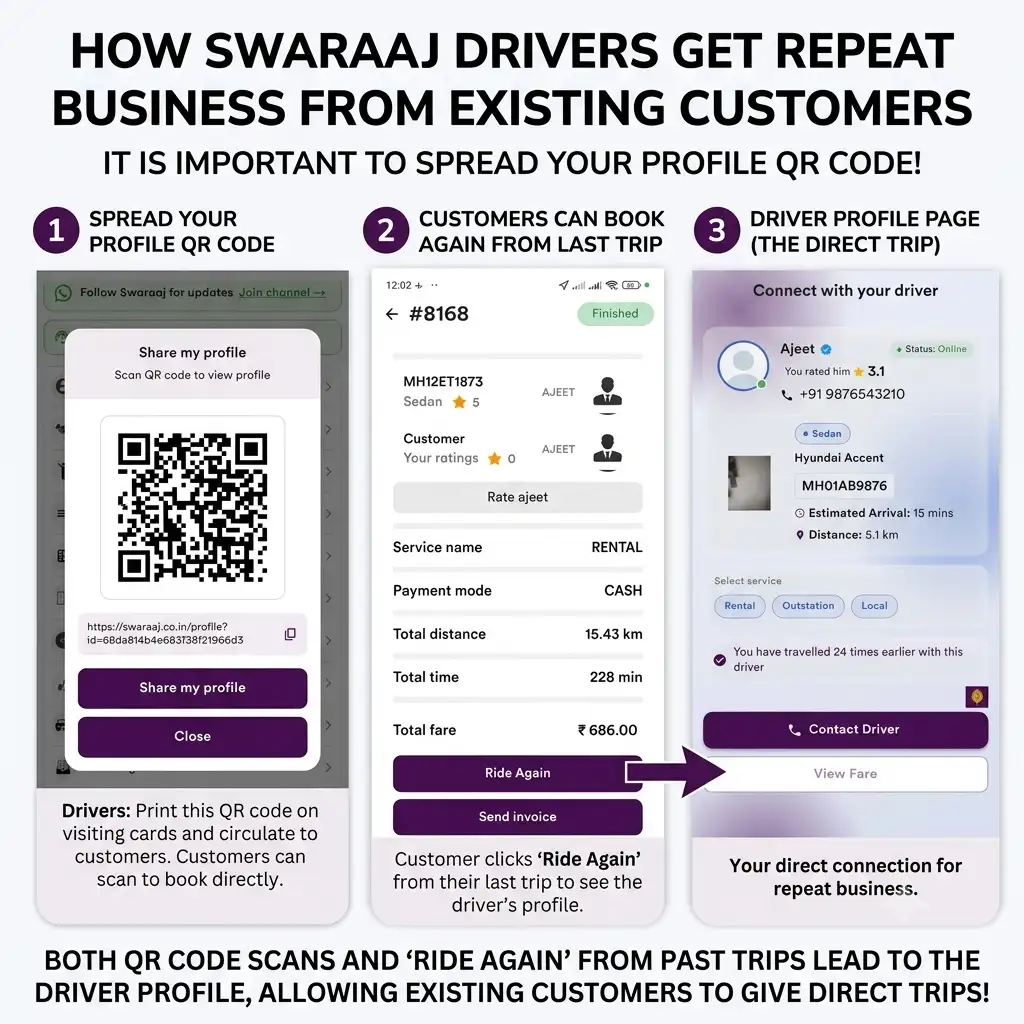
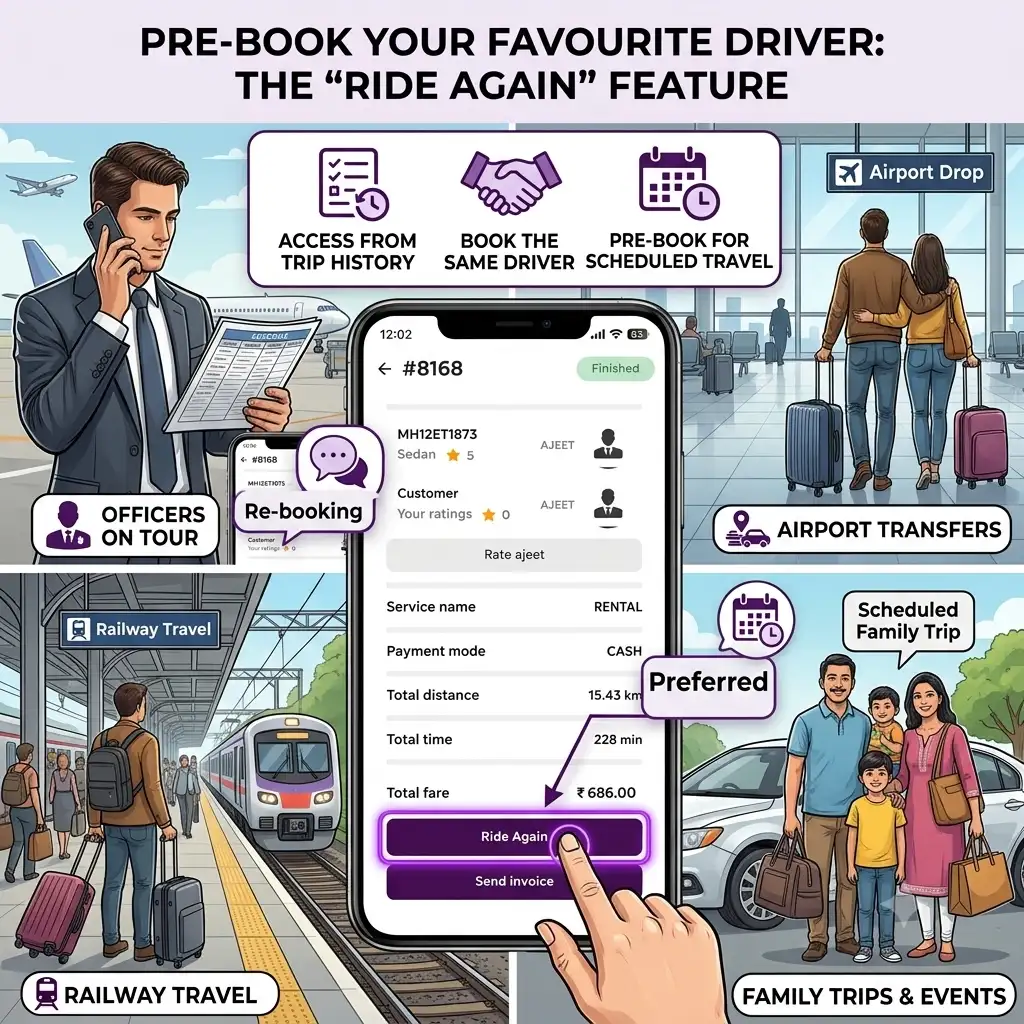
Ride Again helps you reconnect with a driver you have travelled with earlier and request another journey with the same driver. You can access this option from your Trip History.
How do I use Ride Again?Q21
Open My Trips, select a previously completed trip and tap Ride Again. View the driver's profile, check the current status, distance and estimated time from your location. You can contact the driver if you wish, or proceed with a booking request. The driver must be available and accept your new request for the booking to be confirmed.
Ride Again from My Trips
What if I do not remember the name of a driver I travelled with?Q22
You do not need to remember the driver's name. Open My Trips to view your previous journeys and use Ride Again to access the driver's profile. You can also identify familiar drivers through the blue icons displayed on the map.
Can I use Ride Again even if the driver is not currently online?Q23
You can view the driver's profile and check the status displayed in the app. If the driver is offline, you may use the available contact option to check whether they can take your journey. The driver must agree to take the trip.
Offline driver profile
Does Ride Again automatically book the same driver?Q24
No. Ride Again helps you reconnect with the driver and send a new booking request. The driver must accept the request before the booking is confirmed.
Why should I use Ride Again?Q25
Ride Again is useful when you have had a good experience with a driver and would prefer to travel with the same person again. It can be especially helpful for regular office travel, airport journeys, family travel and other journeys where familiarity matters.
Ride Now allows you to book a cab or auto for an immediate journey. Select an available driver, view the fare information and send a booking request. The driver can then accept or reject your request.
How do I book a Ride Now trip?Q27
Open the Rider App, view the available drivers and select your preferred driver, enter your pickup and destination, choose Ride Now. Review the fare shown in the app and send the booking request. Once the driver accepts, proceed with your journey.
Choose Ride Now
Is my Ride Now booking confirmed as soon as I send the request?Q28
No. Sending a request does not mean the booking is confirmed. Your booking is confirmed when the selected driver accepts your request.
Can a driver reject my Ride Now request?Q29
Yes. A driver may accept or reject a booking request depending on their availability and willingness to take the journey. If the driver rejects the request, you can choose another available driver.
Can I see the fare before booking a Ride Now trip?Q30
Yes. For online bookings such as Ride Now, the fare is displayed in the app in advance so that you can review it before sending the booking request.
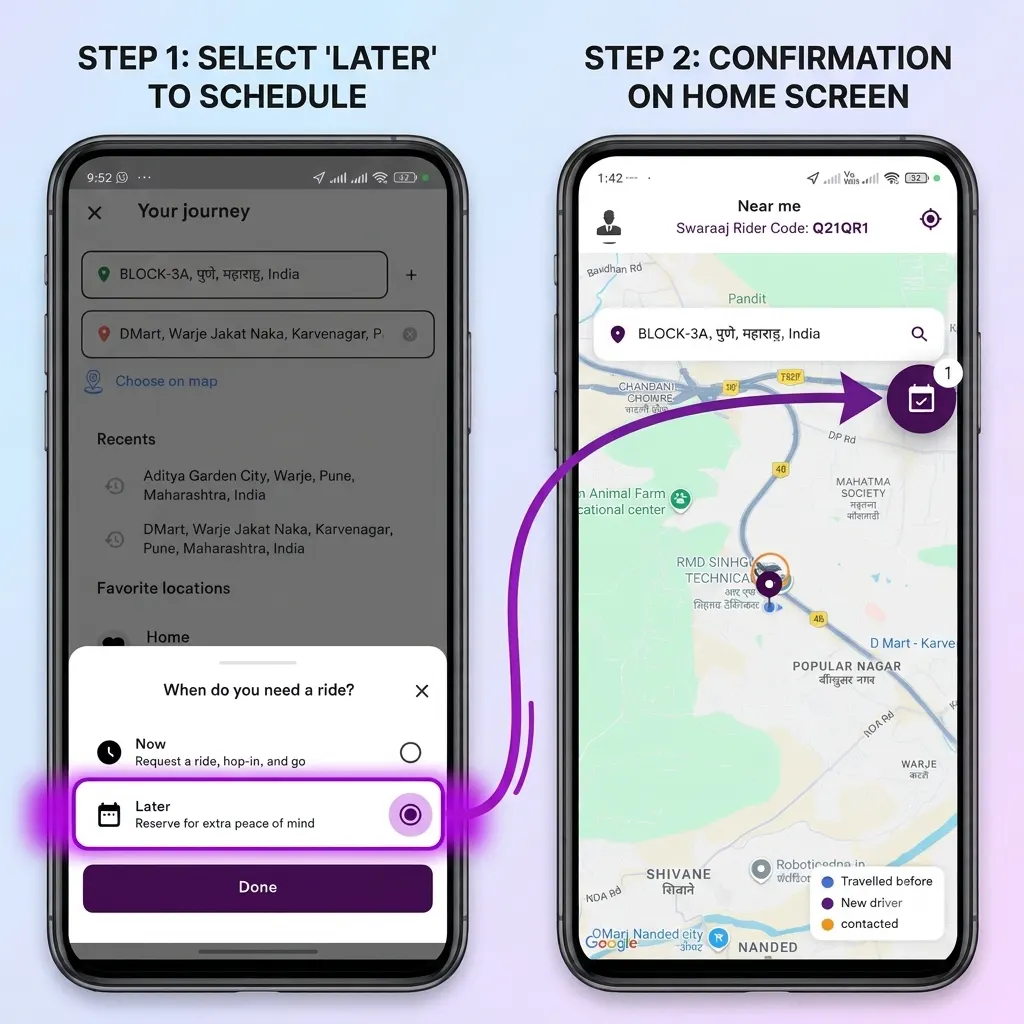
Ride Later allows you to schedule a cab or auto journey for a future date and time. You can select a driver and send a booking request in advance. Once the driver accepts, both you and the driver can plan for the scheduled journey.
Ride Later and scheduled tripsSelect Ride Later
Why should I use Ride Later?Q32
Ride Later is useful when you have an important journey planned and do not want to leave arrangements until the last moment. It can be used for airport or railway station transfers, early morning or late-night travel, office appointments, hospital visits, family functions, rental and outstation journeys. It helps arrange the journey in advance with a driver who has accepted the request.
What is the difference between Ride Now and Ride Later?Q33
Ride Now is intended for an immediate journey. Ride Later is intended for a journey planned for a future date and time. In both cases, the selected driver must accept your booking request before the booking is confirmed.
How do I schedule a Ride Later trip?Q34
1. Open the Rider App, Select a driver from the available options, Enter your pickup and destination details, select Ride Later, choose the required future date and time, review the trip details and send the booking request. Wait for the driver to accept the request.
When is my Ride Later booking confirmed?Q35
Your Ride Later booking is confirmed once the selected driver accepts your request. You can then view the accepted scheduled trip and driver details in My Trips.
Can I use Ride Later for airport or railway station journeys?Q36
Yes. Ride Later can be useful for airport and railway station journeys, particularly when you need to travel at a specific future time. You can schedule the trip in advance and request a driver who can accept the journey.
Can I contact the driver of an accepted Ride Later trip?Q37
Yes. You can use the contact option available in the trip or driver details to communicate with the driver when required.
What happens if the driver cannot take an accepted scheduled trip?Q38
If a driver becomes unavailable for an accepted scheduled trip, the driver may be able to use Ride Transfer, subject to eligibility and another driver accepting the transfer. The purpose is to help avoid unnecessary cancellations and make alternative arrangements where possible. A transfer is not automatic or guaranteed.
Ride Transfer is a feature intended to help a driver transfer an accepted eligible scheduled trip to another eligible driver if the original driver cannot complete it. It is designed to help reduce trip cancellations and support continuity of the rider's planned journey.
Why is Ride Transfer useful for riders?Q40
It can help when a driver who has already accepted a future journey becomes unavailable. Instead of immediately losing the arrangement, the trip may be transferred to another eligible driver who is willing to accept it.
Is Ride Transfer automatic?Q41
No. The original driver must initiate the transfer, and another eligible driver must accept it. A transfer is not guaranteed.
Will I be informed if my scheduled trip is transferred?Q42
You should be able to see the updated driver details once the transfer has been accepted and reflected in the trip.
Can I contact the new driver after a transfer?Q43
You can use the contact details and options displayed against the updated trip to communicate with the new driver.
Does Ride Transfer mean I do not need to cancel and book again?Q44
The feature is intended to help avoid cancellation by allowing an eligible accepted scheduled trip to be transferred to another driver. Whether the transfer succeeds depends on another eligible driver accepting it.
RIDE TOGETHER — TRAVEL TOGETHER AND SHARE THE COST
What is Ride Together?Q45
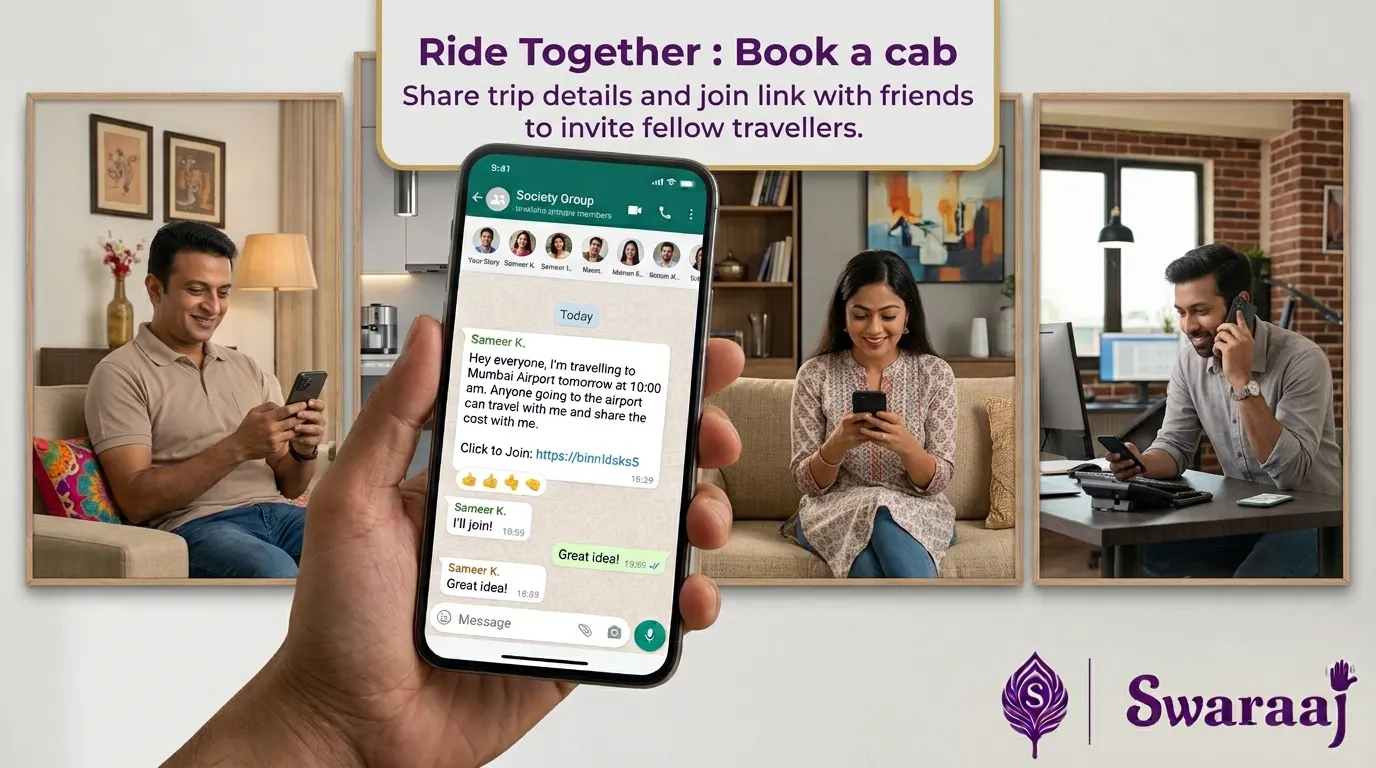
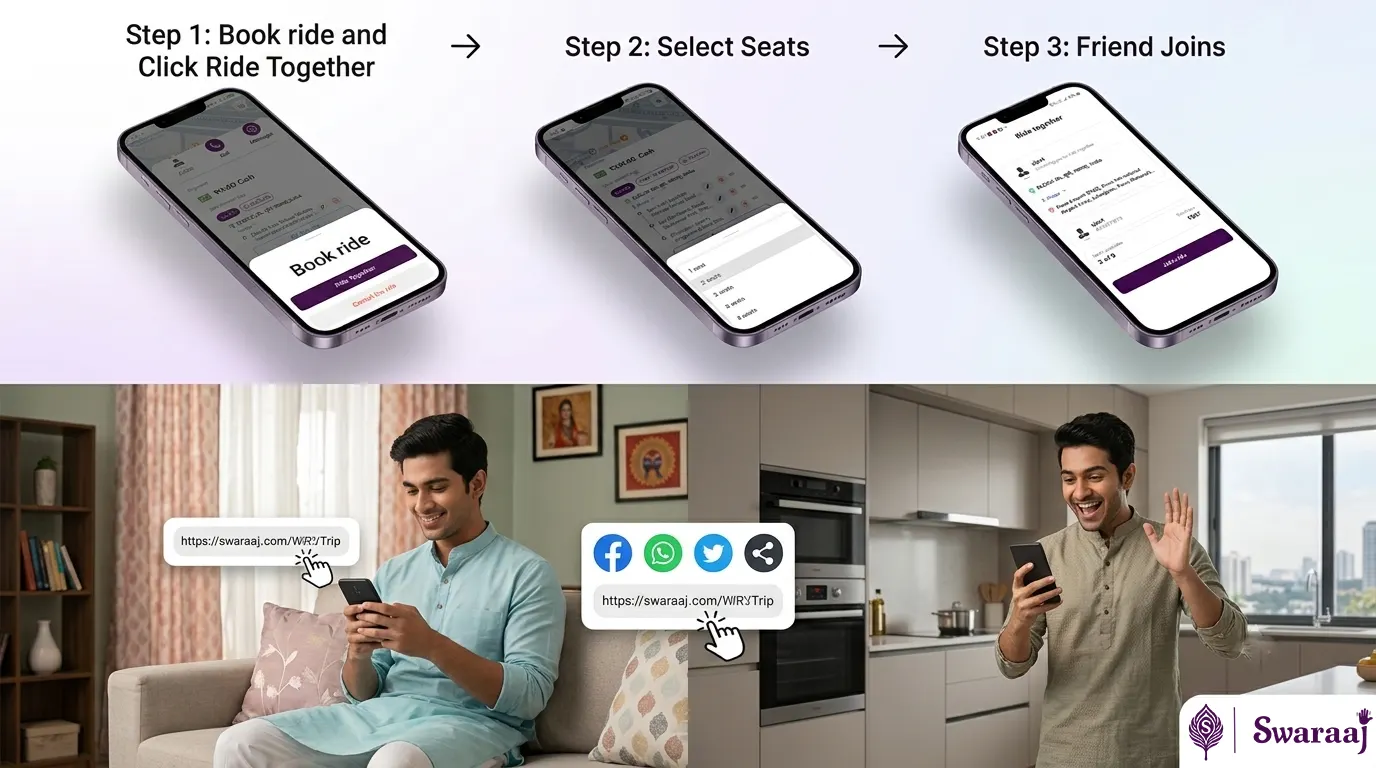
Ride Together allows a rider who has arranged an eligible trip to invite friends, family members or colleagues to join the same journey. Share the trip invitation link with known contacts. They can review the trip details and join if they are travelling in the same direction.
Ride Together invitation and total fare
How does Ride Together help me save money?Q46
Instead of travelling separately, people going in the same direction can travel together in one vehicle and coordinate sharing the travel cost among themselves. This can help reduce individual travel expense compared with taking separate vehicles.
How many additional riders can join a Ride Together trip?Q47
The Ride Together flow supports up to two additional joining riders, subject to the vehicle's permitted seating capacity and applicable conditions.
How do I create a Ride Together trip?Q48
Use the Ride Together option available for an eligible trip and share the invitation link with your friends, family or colleagues. They can open the link, review the trip details and join if it suits them.
How can my friend or colleague join my Ride Together trip?Q49
They can open the Ride Together invitation link shared with them. The app displays the trip details and total fare. They can review the information and tap Join Ride to join the journey.
Join Ride Together
Does Ride Together automatically search for and match riders travelling in the same direction?Q50
No. Ride Together does not automatically search for, match or suggest other riders. You share your trip details with your own friends, family members or groups to check whether someone you know is travelling in the same direction. You decide whom to invite and who joins your trip.
Does the fare shown on the Ride Together invitation screen represent each rider's share?Q51
No. The fare shown on the invitation screen is the total trip fare, not an individual rider's share. Participants can coordinate among themselves how they want to share the cost.
Does Swaraaj automatically divide the fare among Ride Together participants?Q52
No. Swaraaj does not automatically split or collect separate fare shares from participants. They can decide among themselves how to share or reimburse the travel cost.
Will each Ride Together participant see the trip in their own My Trips?Q53
Yes. Each participant who joins the trip can see the trip in their own My Trips.
Can a rider leave a Ride Together trip after joining?Q54
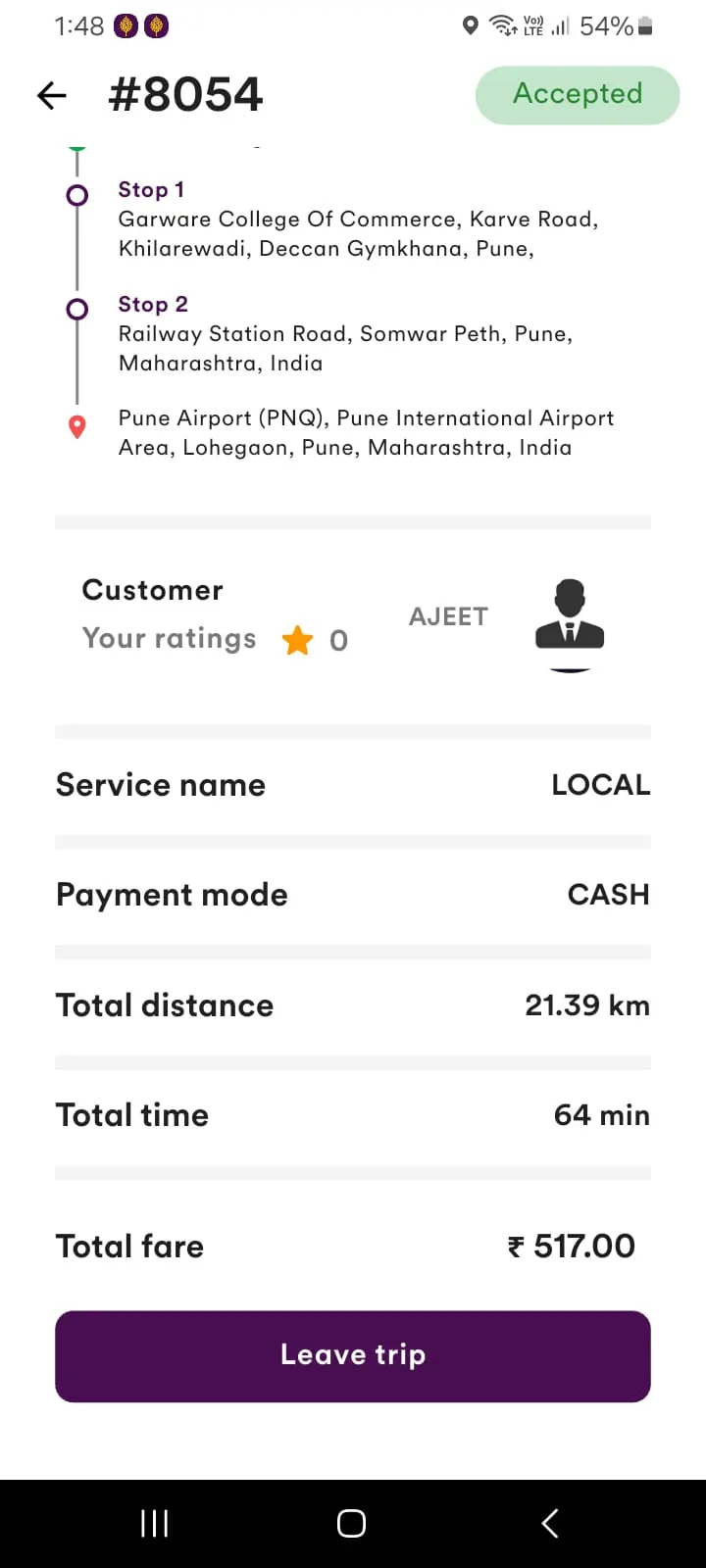
Yes. A rider who has joined can leave the trip before the journey becomes live. This makes the seat available for another rider to join, subject to the trip's joining limit and conditions. Visit My trips and use the option of Leave Trip
Leave a joined trip before it goes live
Can I invite friends or colleagues to join my trip?Q55
Yes. Share the Ride Together invitation link with people you know, such as friends, family members or colleagues who may be travelling in the same direction.
What types of trips can I book through Swaraaj?Q56
Depending on driver and vehicle availability, Swaraaj supports Local, Rental, Outstation One-Way, Outstation Round and Hail/Spot trips.
What is a Local Trip?Q57
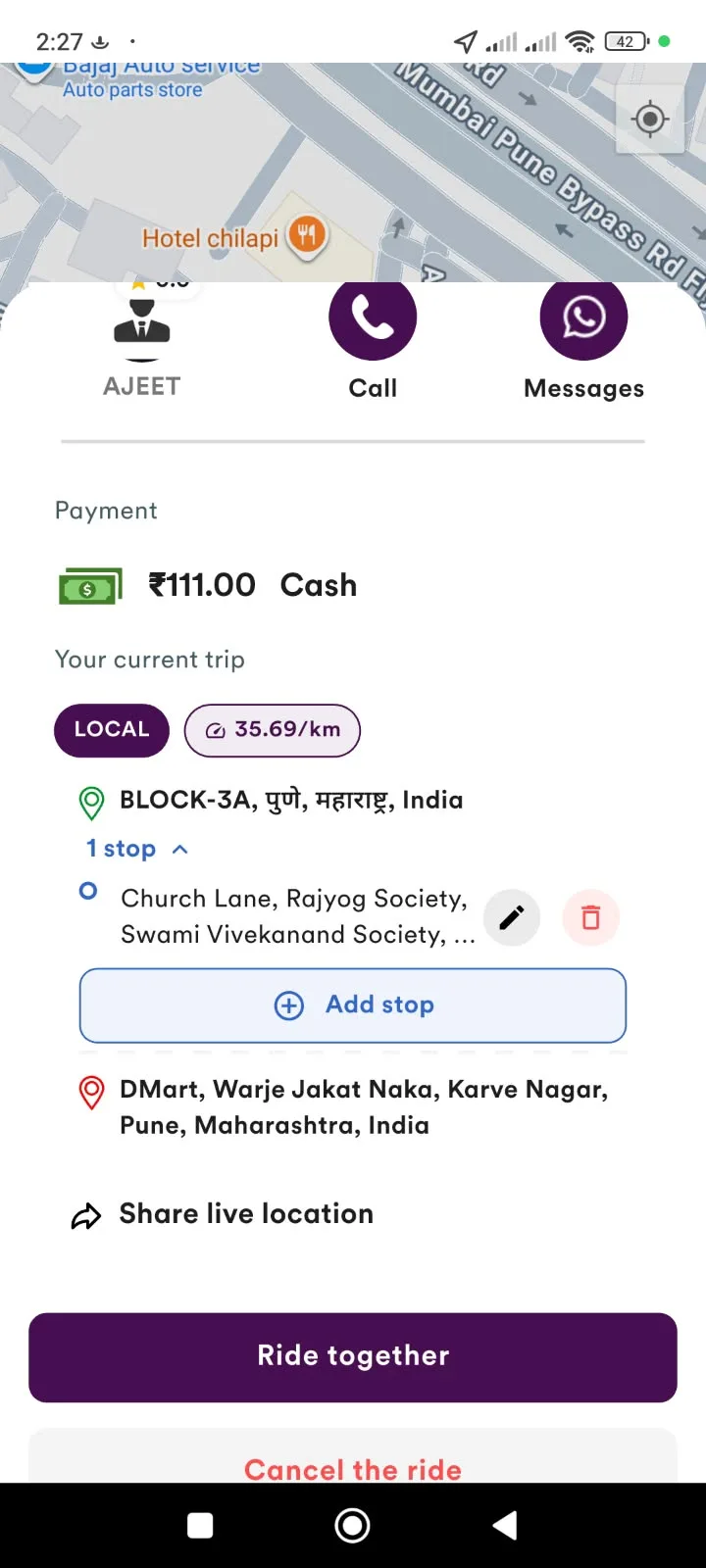
A Local Trip is a journey within a city or local area from your pickup point to your destination. You can also add intermediate stops during the trip, where required.
What is a Rental Trip?Q58
A Rental Trip allows you to book a vehicle for a specified package or duration, depending on the options available in the app. It is useful when you need a vehicle for multiple visits or journeys within a period.
What is an Outstation One-Way Trip?Q59
An Outstation One-Way Trip is a journey from your pickup location to a destination outside your city or local area, without a return journey included in the booking. You can add intermediate stops along the route.
What is an Outstation Round Trip?Q60
An Outstation Round Trip includes travel from your pickup location to the destination and a return journey to the selected return location. The journey is Pickup → Destination → Return To. You can add intermediate stops where required.
Can I book a trip for someone else?Q61
Yes. Search for a driver at the required location and use the Book for someone else option to arrange a trip for a family member, friend, employee or another person.
Yes. You can add intermediate stops even after the trip has started. This is useful when you need to visit additional places during the journey.
Live trip controls
Is there a limit on the number of stops I can add?Q63
Swaraaj allows you to add multiple stops during a live trip without a fixed app-imposed stop limit.
Can the rider add stops during a live trip?Q64
Yes. The rider can add stops during the live trip using the option available on the trip screen.
Can the driver also add stops?Q65
Yes. The driver can also add stops during the live trip.
Can I edit or delete a stop after adding it?Q66
Yes. Stops can be edited or deleted during the live trip using the controls available on the trip screen.
Can I change the order of stops?Q67
Yes. You can rearrange the stops to change the order in which the locations will be visited.
Can I use multiple stops for office or business visits?Q68
Yes. The multiple-stop feature is useful for people who need to visit several locations during one journey, such as office employees, sales professionals, business owners and people attending multiple appointments.
Will the stops be shown in my final invoice?Q69
Yes. The trip invoice includes the trip details and the stops recorded during the journey.
Does reaching an intermediate stop end my trip?Q70
No. Reaching an intermediate stop does not complete the trip. The journey continues until the final destination is reached and the trip is ended.
The fare depends on the trip type and applicable fare components, such as distance and time. Additional charges, where applicable, are shown separately in the final invoice.
Can I see the fare before starting my trip?Q72
For online trips booked through the Rider App, the fare is displayed in advance before you send the booking request. For Hail/Spot trips, the driver shows the fare to the rider before the trip starts. The fare information and applicable components are displayed according to the trip type.
Does Swaraaj have surge pricing?Q73
Swaraaj does not use an automated surge-pricing mechanism that increases fares based on demand. The fare is shown to the rider before an online booking request is sent. For Hail/Spot trips, the driver shows the fare before the trip starts.
What charges are included in the trip fare?Q74
The fare and invoice may include distance charges, time charges, applicable taxes and a fixed Trip Management Fee. The Trip Management Fee is a fixed amount for each trip type and does not change according to the total fare amount. It is displayed separately.
What are additional charges?Q75
Additional charges may include applicable waiting charges, night charges and other applicable charges. These are shown under the additional charges section of the invoice, as applicable to the trip.
Are toll charges and parking charges included in the fare?Q76
No. Applicable toll and parking charges are extra and are payable in addition to the trip fare separately to the driver. They are not reflected in the final fare or invoice.
How are waiting charges calculated?Q77
Waiting charges apply when the driver has reached the pickup location and is required to wait, and also when waiting occurs between stops during the journey. The first 5 minutes of total waiting time are free. After that, waiting charges are calculated at ₹5 per minute.
Is the free five-minute waiting time available at every stop?Q78
No. The five-minute free allowance applies to the total waiting time for the trip, not separately to every stop. Once the total free allowance is used, applicable waiting charges are added.
What are night charges in Swaraaj?Q79
Night charges apply to trips operating between 11:00 PM and 6:00 AM India time. The night charge increases the overall fare by 25%. For example, if a trip starts at 10:00 PM and ends at 11:10 PM, night charges will be included in the final bill because part of the trip falls within the night-charge period.
Where can I see the final fare and additional charges?Q80
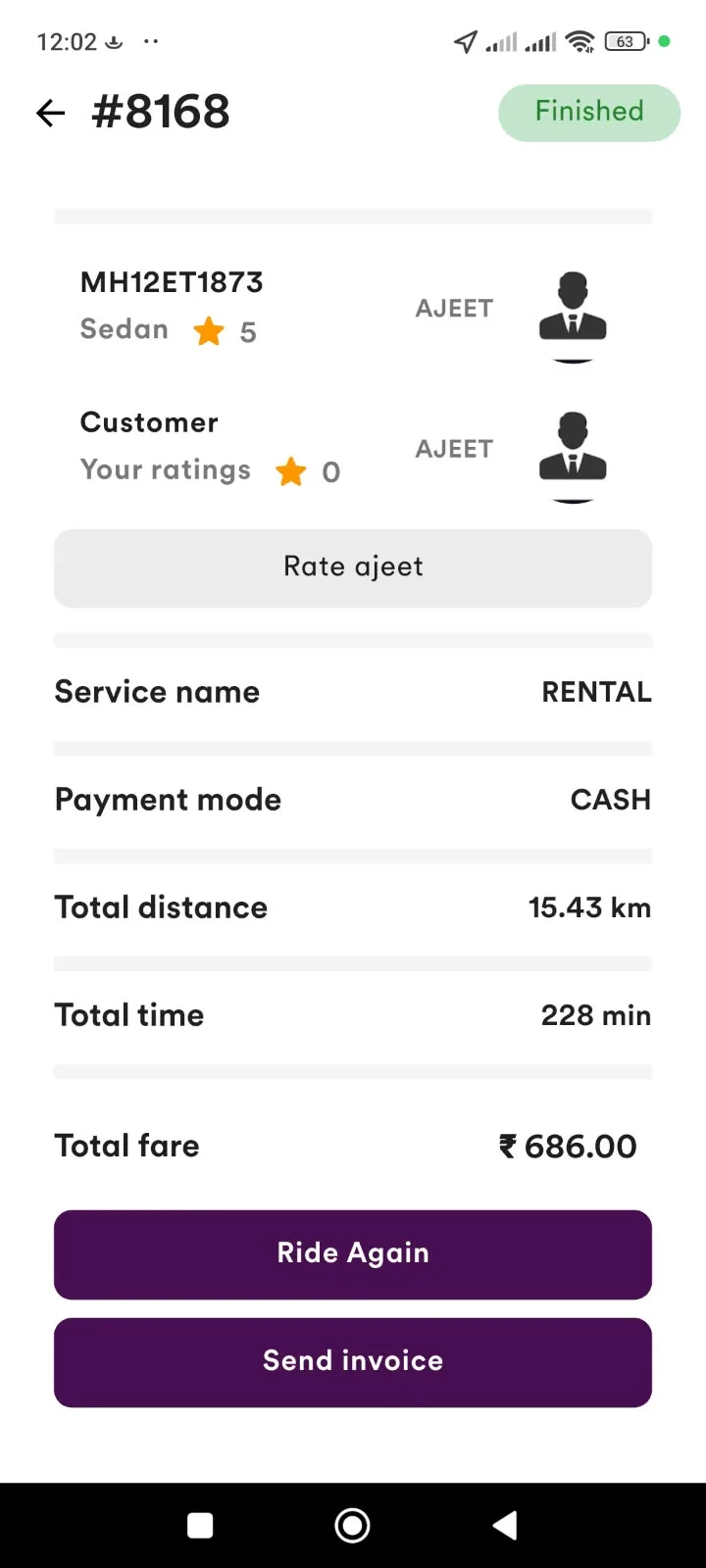
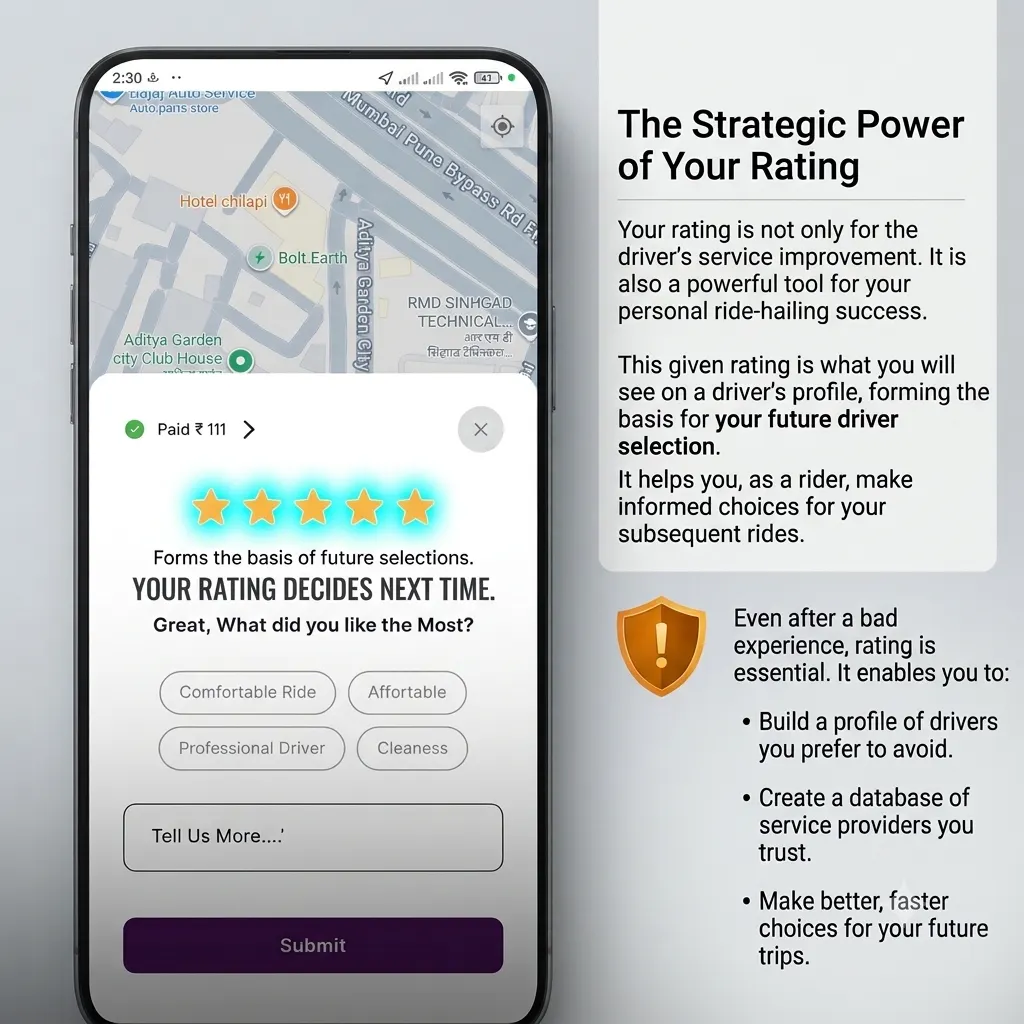
You can view the final fare after the trip is completed. The final fare screen and invoice show the fare and applicable charges.
Final fare and rating screen
Whom do I pay for my trip?Q81
The trip payment is made directly to the driver. You can pay using the payment methods supported for the trip, such as cash or UPI, as applicable.
A Hail/Spot trip is a journey where you approach a Swaraaj cab or auto directly on the road and travel with the driver without first booking the trip through the Rider App.
Is it compulsory to share my Swaraaj Rider Code or mobile number for a Hail/Spot trip?Q83
No. It is not compulsory to share your Rider Code or mobile number. However, sharing either one helps link the trip to your Swaraaj account or mobile number so that you can maintain trip history in the Rider App, track the live trip through the app, receive the trip invoice after the journey and access the driver details again through your trip history.
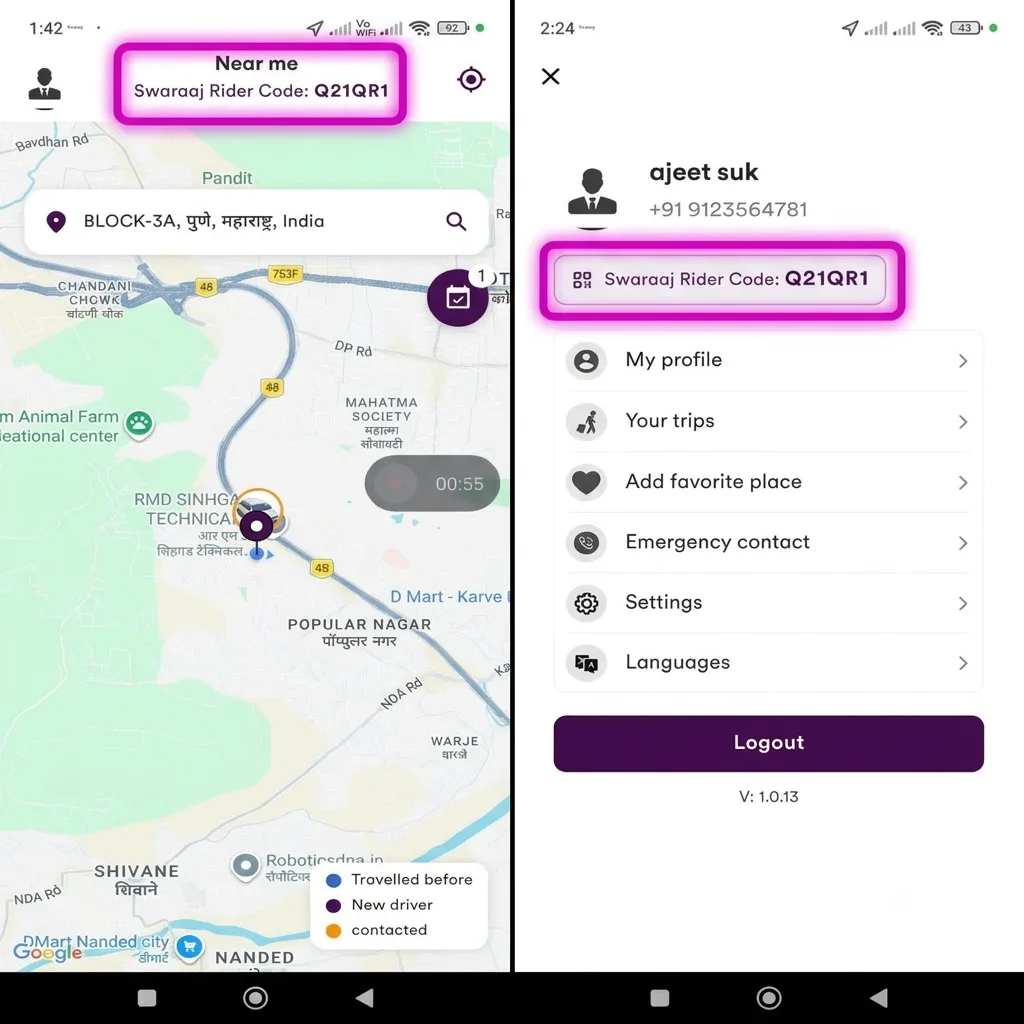
Where can I find my Swaraaj Rider Code?Q84
Your Rider Code is available in the Rider App. You can access it from the app's menu/profile area and share it with the driver before the Hail/Spot trip starts.
Rider App menu
What if I am not registered on the Swaraaj Rider App? How does sharing my mobile number help?Q85
If you are not registered, you can share your mobile number with the driver before the Hail/Spot trip starts. The trip can then be recorded against that mobile number. Later, if you register on the Swaraaj Rider App using the same mobile number, you can view the trip in your trip history and use the available options to contact the driver again.
What happens if I do not share either my Rider Code or mobile number?Q86
If you do not share your Rider Code or mobile number, the Hail/Spot trip cannot be linked to your Rider App account or mobile number. You may therefore not be able to access that trip through your app's trip history.
Why should I share my Rider Code or mobile number for a Hail/Spot trip?Q87
Sharing your Rider Code or mobile number helps you maintain a record of the journey. It also makes it easier to access trip history, track the live trip through the app and receive the invoice after the trip ends.
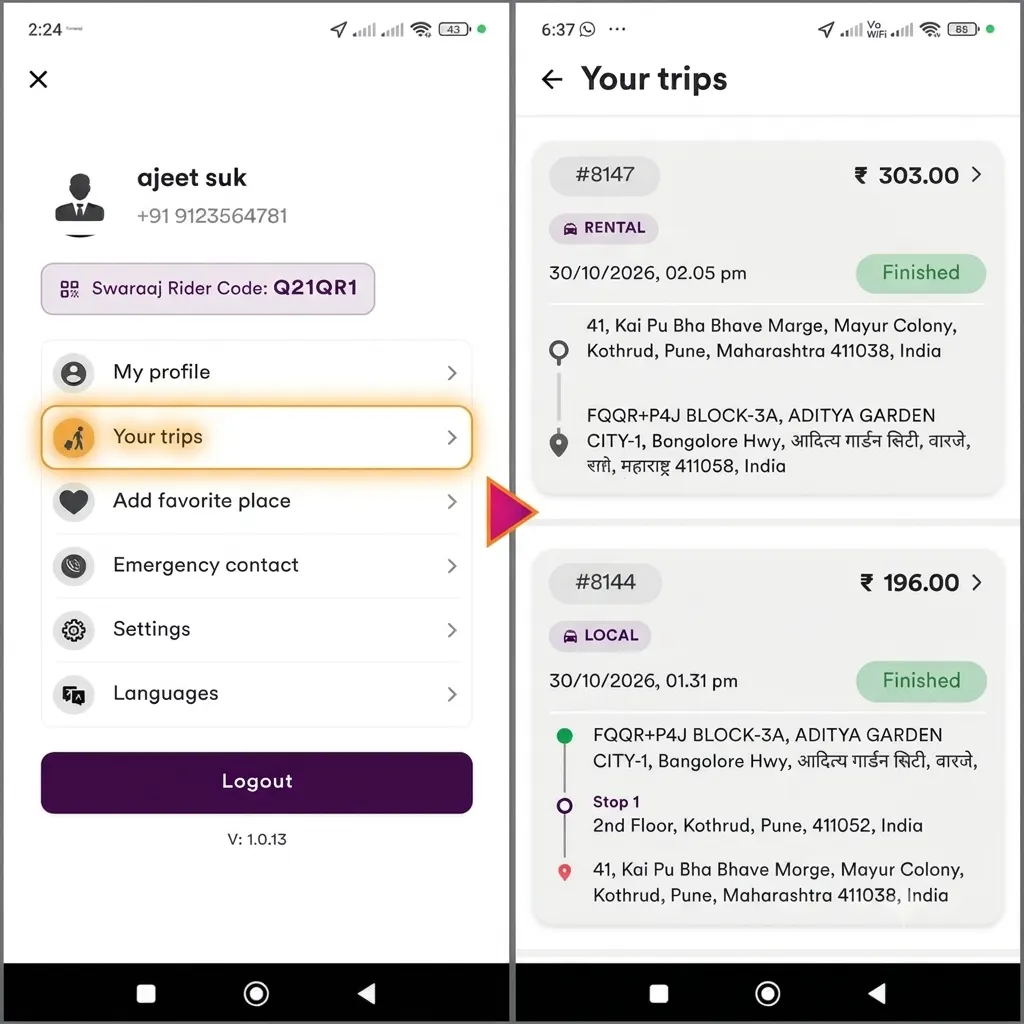
You can view your completed and relevant trip details in the Your Trips section of the Rider App.
Access My Trips from the menu
Will I receive an invoice after completing a trip?Q89
Yes. After the trip is completed, the invoice is sent to your registered email address, where available, and can also be accessed through the app's trip history.
Can I email an invoice again if I need it later?Q90
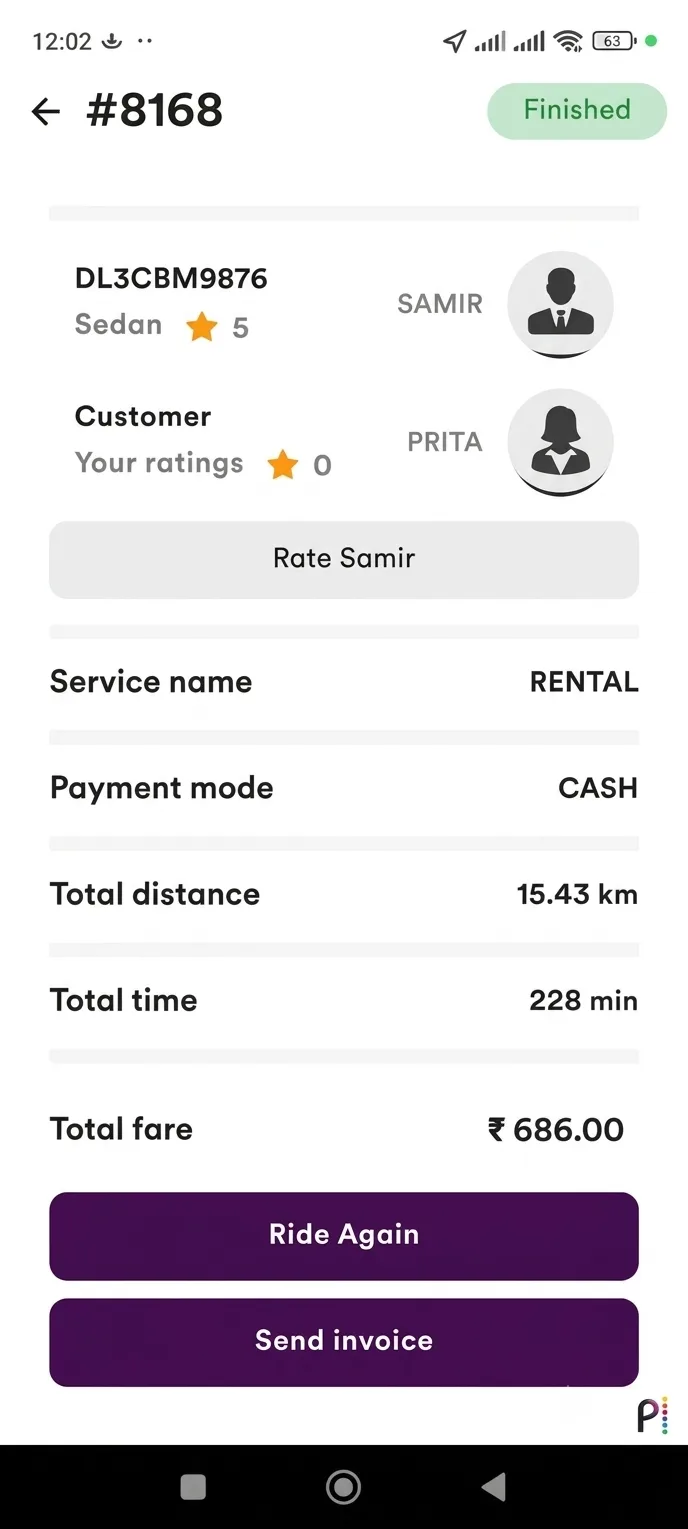
Yes. Open the relevant completed trip in My Trips and use the Send Invoice option to email the invoice again.
Ride Again and resend invoice
What information is shown in the trip invoice?Q91
The invoice includes relevant trip information such as driver and vehicle details, trip type, distance, time, fare components and applicable additional charges.
Can I use Swaraaj invoices for office or business records?Q92
Yes. You can access your trip invoices and email them again when required. They can be retained for personal, office or business travel records, subject to the requirements of the organisation concerned.
Can I book the same driver again from my Trip History?Q93
Yes. Open the completed trip in My Trips and select Ride Again to access the driver's profile and request another journey.
Can I track my trip live through the Rider App?Q94
For trips linked to your Rider App account, you can use the live trip screen to access trip information and available live tracking features. For Hail/Spot trips, sharing your Rider Code or mobile number before the trip starts helps link the journey to your account or mobile number.
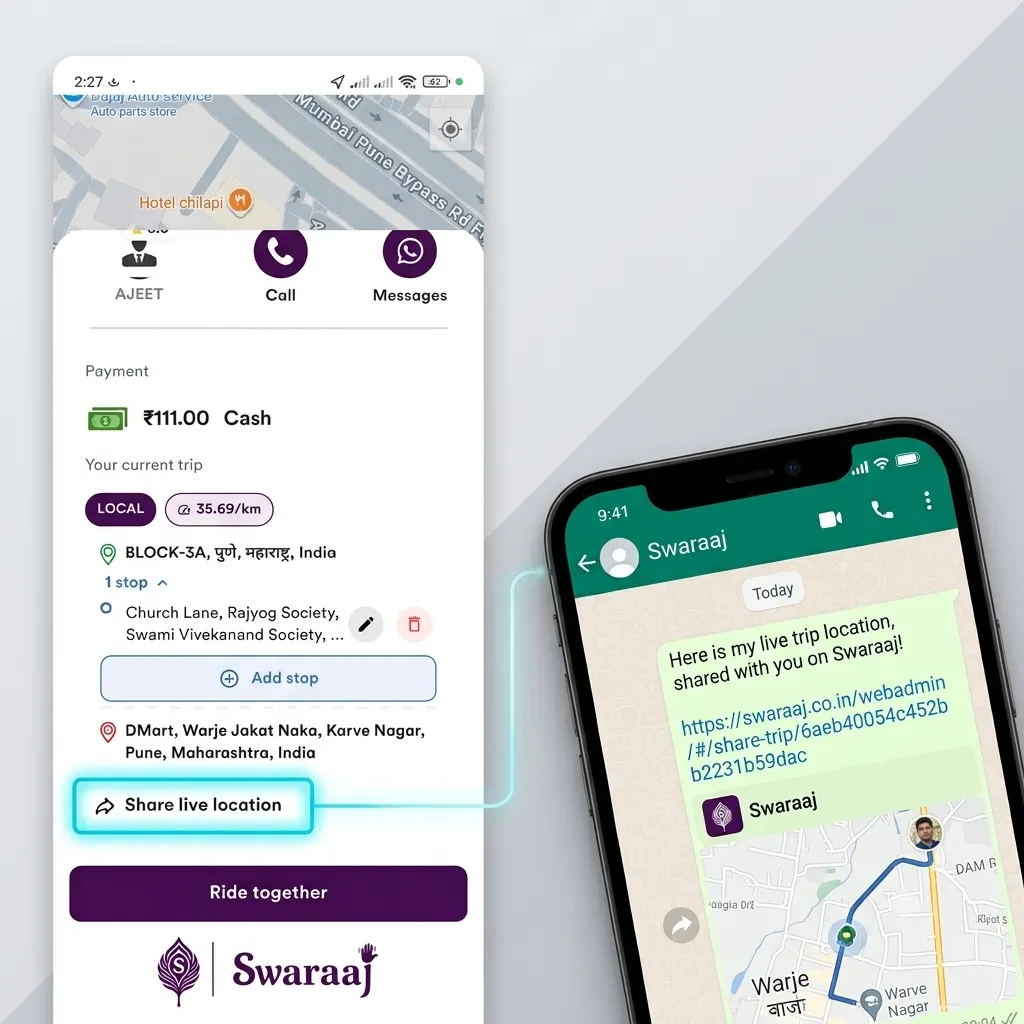
Live trip screen and controls
Can my family track my journey?Q95
You can use the live location sharing option available on the trip screen to share your journey location with family members or other people.
Can I share my live location during an outstation or long-distance journey?Q96
Yes. Use the Share Live Location option available on the live trip screen to share your location with others.
Can I call or message the driver during a trip?Q97
The live trip screen provides options to contact the driver, including calling or messaging through WhatsApp, where available.
Can I use live location sharing instead of contacting the driver?Q98
Live location sharing helps others follow your journey, but it does not replace direct communication with the driver when you need to discuss pickup details, stops or other trip-related matters.
How can I choose a driver based on my previous experience?Q99
You can identify drivers you have travelled with earlier using the familiar-driver indicators (vehicle in blue circle on map) and information displayed on their profiles. You can also check the number of previous trips with that driver and your own average rating given to the driver. Hence it is recommended to rate the driver aftre every trip you make
Your driver rating
What should I check before choosing a driver?Q100
You can consider the driver and vehicle details, driver's distance and estimated arrival time, number of times you have travelled with the driver earlier, and your own average rating given to that driver. Swaraaj shows your average rating of that particular driver based on your own experience. It is not necessarily the driver's global rating from all riders. This helps you make a choice based on your previous experience.
Driver profile and your previous experience
Can I arrange a Swaraaj trip for my family member?Q101
Yes. Search for a driver at the required location and use the Book for someone else option to arrange a trip for a family member or another person.
Arrange a trip for someone else
Can I use Swaraaj for regular office or business travel?Q102
Yes. You can use Swaraaj for everyday travel, office journeys, customer visits, appointments and other personal or business travel requirements. Ride Again, Ride Later and multiple stops can be useful for regular travel.
Why is travelling again with a familiar driver useful for family members?Q103
If you have previously travelled with a driver and had a good experience, you may prefer to arrange another journey with that driver for yourself or your family members. Swaraaj helps you find and reconnect with such drivers through your trip history and familiar-driver indicators.
Why is my Hail/Spot trip not visible in My Trips?Q104
For a Hail/Spot trip to be linked to your Rider App account, you need to share your Swaraaj Rider Code or mobile number with the driver before the trip starts. If neither was shared, the trip may not be linked to your account and therefore may not appear in My Trips. For online trips booked through the Rider App, the booking is linked to your account and the relevant trip details are available through the app.
What should I do if my completed trip is not visible in My Trips?Q105
First check whether the trip was booked online through your Rider App or taken as a Hail/Spot trip. For Hail/Spot trips, confirm whether you shared your Rider Code or mobile number before the trip started. If the trip was booked online and is still not visible, contact Swaraaj support with the trip details.
What should I do if I have not received my invoice by email?Q106
Check the email address registered with your Rider App and look in your spam or junk folder. You can also open the completed trip in My Trips and use the Send Invoice option to email it again.
What should I do if I cannot contact a driver?Q107
Check the contact options displayed in the driver's profile or relevant trip screen. You can also refer to the driver's details in the invoice for a previously completed trip.
How can I contact Swaraaj for assistance?Q108
You can contact Swaraaj through the support/contact details provided in the Rider App or on the official Swaraaj website.
Can I search for drivers in a different area from where I am currently located?Q115
Yes. You can search for drivers in another location by selecting or entering that location in the Rider App. This is useful when arranging a trip for someone else or planning a journey that starts from a different place.
Search in another location
Can I save my frequently used locations?Q116
The app provides recent and favourite location options where available. You can use these options to make it easier to select locations you use frequently.
Can I see how many scheduled trips I have?Q117
Yes. The Ride Later option on the home screen displays the number of scheduled trips associated with your account.
Scheduled trip count on home screen
Can I rate the driver after completing a trip?Q118
Yes. After the trip is completed, you can rate the driver and provide feedback about your experience. Your rating can help you refer to your own experience when choosing that driver again.